Claude Code vs Cursor: Speed, Pricing and Use Case Comparison (2026)
Claude Code and Cursor are two different approaches for working with AI coding models directly in your files. But they are hard to compare, because they are not the same kind of thing. First we have to separate two concepts: the model and the tool around it.
The model is the AI that reads and writes code. The tool around it is a normal program: it looks and behaves like a chat interface, it feeds your files to the model, runs commands for it, and applies its edits. Developers call this program a harness. Anthropic’s docs say it like this: “Claude Code is the harness; Claude is the model inside it.”
Cursor is an editor, a specialized software for viewing and editing code, with such a harness built in. It lets you choose the model: the Anthropic and OpenAI models, open source models, or Cursor’s own model, Composer 2.5, which answers fast and at a decent quality.
Claude Code is a harness without an editor. Anthropic built it around its own Claude models. It is especially good at completing long, complicated tasks independently.
I used both, and I measured both. The short answer: Cursor with its Composer model responds to your messages faster, but it needs more micromanagement. Claude Code does more work per response and finishes tasks more completely. So my total time per task is lower with Claude Code. Which one you should pay for depends mostly on your budget and on how much you want to read the code you produce.
What is the actual difference between Claude Code and Cursor?
Claude Code is the coding environment built by Anthropic for the Claude family of language models: Fable, Opus, Sonnet, Haiku. The Claude models do the thinking, Claude Code is everything around it: file access, terminal access, permissions, and the loop that keeps the model working until the task is done. There is a terminal version (CLI), or you can access Claude Code in 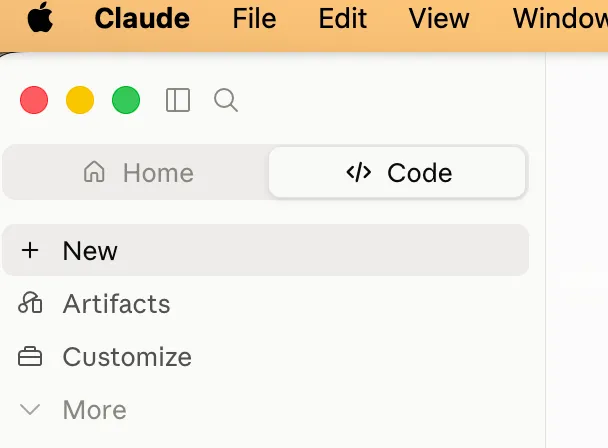 . The app is generally much more accessible, if you have no prior experience with working in a terminal, the app is the obvious choice.
The CLI is the same agent without the interface: 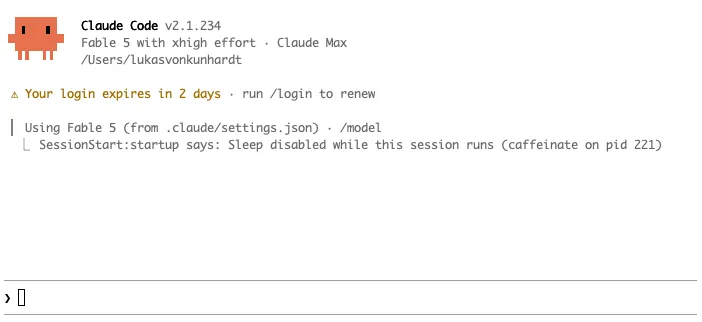 .
.
I like working with the terminal because I can have  , and I can quickly navigate between folders and servers with terminal shortcuts, which most people won’t be using.
You also CAN use Claude Code in an IDE. So there are three options: you can use the Claude Code CLI, you can use the Claude app, and you can use the Claude Code VS Code extension, either in VS Code OR in Cursor.
The one thing you cannot really choose in Claude Code is the model. Officially it runs Claude models only. You can point it at other models through an API proxy, and people do, but Anthropic does not support this, and updates break these setups regularly. Artificial Analysis even benchmarks Claude Code running foreign models this way: the same harness scores 67 with Opus 5 and 31 with DeepSeek. So in practice if you are using Claude code, you will be using the Claude models and an Anthropic subscription. (The alternative would be to use API based billing, which is prohibitively expensive)
Cursor on the other hand is an IDE, a specialized interface for developers. It is based on VS Code, which has a lot of useful features built in for viewing and editing code. If you prefer to read and understand the code you are editing, you will need an IDE anyway.
Cursor added a chat interface and a tab completion model to VS Code, so that you can edit code directly, or easily see where edits are made. Cursor lets you choose between a large variety of models: its own models (Composer 2.5, and since the SpaceX deal also Grok), the Claude models, the GPT models, Gemini, and self-hosted models exposed via an API.
So the comparison is not apples to apples. Cursor specializes in how you work with the code; Claude Code specializes in how much work you can hand over.
You can watch this specialization happen: early Claude Code showed you every diff prominently. Today the automatic mode hides the code more and more, because handing the work over is the workflow Anthropic sees people use.
Is Claude Code slower than Cursor? I measured it.
Cursor’s Composer 2.5 model answers much faster than the Claude models, and that appealed to me. I am looking for a more interactive model to code with, so that I can work on one task at a time. If the model always takes 5 minutes to respond, I usually do 2-3 things in parallel, which is mentally taxing.
So I measured both tools the same way: wall-clock time from the moment I submit a prompt until the agent stops working. It measures the thing I actually care about: after I send a prompt, how long am I waiting before the agent is done enough that I can think again?
For Claude Code, I parsed my local session logs: 1,814 turns over the last 30 days, all on Claude models. For Cursor, I used Cursor’s agent hooks to log every prompt and every stop event; those turns all ran on Composer 2.5 Fast. So the table compares two tool-plus-model pairs, which is how you use them in practice.
| Claude Code + Claude models (n=1,814) | Cursor + Composer 2.5 Fast (n=54) | |
|---|---|---|
| Median turn | 92 s | 32 s |
| Average turn | 3.9 min | 55 s |
| p90 | 8.7 min | 1.8 min |
| Turns over 5 min | 18% | 2% |
By this measure, the Cursor and Composer pair wins clearly: about three times faster at the median.
But then I noticed something odd. I still defaulted to Claude Code. You can see it in the sample sizes: 1,814 turns against 54. Part of that is that I logged Claude Code for longer. But the window is longer because I kept coming back to it.
Why? Composer responds faster, but it also does less work per response. Before it hands control back, Composer works for about 55 seconds. Claude Code works for about 4 minutes. Composer does not finish tasks faster. It cuts them into more pieces and hands each piece back to me.
I looked for a benchmark to check this intuition, and found one. Artificial Analysis benchmarks coding agents as tool-plus-model pairs, measured by wall-clock time until a whole task is actually finished, with no human in the loop. Composer 2.5 scores 62 and needs 9.3 minutes per finished task. So even with nobody waiting between turns, the fast model does not finish tasks fast. Claude Code with Opus 5 at maximum effort scores 67, the top score, and needs 23.6 minutes. That looks slower, until you put it next to my turn data: Claude Code spends that time in a few long, autonomous stretches. Composer spends its minutes in many short steps, and each hand-back lands on your desk.
So Composer is a micromanagement model. You save money, but you have to stay involved. That is probably not what people expect when they read the headlines about how fast Cursor is. Per response, it IS faster. Per task, it is not. Composer’s real advantage is not speed. It is price.
But micromanagement is not bad for everyone. There are people who want to be very involved and work in very small steps. If you work closely with the code and want to develop a deep understanding of it, this might not be a bad thing.
One caveat so you can judge my data: the Cursor sample is small: 54 turns over two days, all on Composer 2.5 Fast, mostly writing tasks rather than coding. The Claude Code sample is 30 days of everything I do.
Which one is better, and for whom?
Claude Code is targeted at being your sparring partner. You do not read the code. You make judgment calls: what should be built, and is the built thing good, by clicking through whatever comes out. That only works if you make the bet that the agent works well on its own. Cursor is more like the machine room. If you work on high-stakes applications, you are forced to read the code and develop a deep understanding of it, and then you need an IDE anyway: Cursor, or VS Code with the Claude Code extension.
The second difference is money: pricing and model selection. You obviously have much less vendor lock-in with Cursor, and they have much cheaper models available, like the Composer 2.5 model. BUT the most capable models have lately been either the OpenAI or Anthropic models, and both of these are available cheapest through the respective provider. So if you want to use Claude models and want to save money, it’s cheapest to use their subscription. If cost savings are most important to you, and it’s fine for you to use a good model, but maybe not the cutting edge, Cursor will offer the better deal.
Can you use Claude Code inside Cursor?
Yes. The question confuses many people, and the answer only makes sense once you separate model from tool. Cursor is based on VS Code, so the official Claude Code extension could technically install directly in it. If you have subscriptions to both, you get Cursor’s editor and Tab completion, and next to it the full Claude Code agent on your Claude subscription. The two are separate programs that share a window. The reverse does not work: you cannot select Composer inside Claude Code.
What do they cost in practice?
Claude Code at the 20 dollar tier is for regular work basically unusable. You will hit the limit immediately when working more than a couple of hours with it, especially if you select the larger models: the 20 dollar tier defaults to Sonnet, Opus drains the limit several times faster, and Fable 5 is not included at all: you pay for it with usage credits. On the Max plans, Fable 5 is included since July 2026, capped at half of your weekly limit. The Cursor 20 dollar tier will actually get you quite far, assuming you choose cost-effective models like Composer 2.5: Cursor bills its own models separately from the 20 dollars of included third-party model usage, so Composer turns barely touch that budget. So if you have a small budget and want the most bang for the buck, Cursor is the way to go. If you have a larger budget and model quality is most important, I would go with Claude.
The benchmark numbers say the same: on Artificial Analysis, a Composer 2.5 task costs about 7 cents in API terms, while the same task with a frontier model in Claude Code or Codex costs 7 to 12 dollars (!!!) (as listed in August 2026). Composer scores about 10 percent below the frontier models on the coding index, at about 1 percent of the cost per task.
When is Cursor the better choice?
If you are writing code and want a tab completion model, Cursor is leading in the field, Claude Code has no equivalent. So there Cursor is actually better, no matter which model you chat with. If you want to avoid vendor locking and want to be able to use a variety of different models, Cursor is also the way to go.
What does the SpaceX acquisition mean for Cursor?
On August 14, 2026, SpaceX closed its $60 billion acquisition of Cursor. The Grok integration is not an announced plan anymore, it has already shipped: Cursor and SpaceX’s AI division trained Grok 4.5 and 4.6 together, and Cursor now lists Grok next to Composer as one of its own models. For the Claude and GPT models inside Cursor, nothing has changed so far. But Cursor’s own models now compete with the third-party models it resells, and Cursor’s Auto mode decides which model handles your request. I would not panic, but I would keep my work portable.
What about Codex?
Codex is the same pattern as OpenAI one more time: a harness built by OpenAI around its own GPT models. Codex is gaining a lot of momentum, and lately people are switching at a really high rate from Claude Code to Codex. The switch is mostly due to GPT-5.6 Luna being reduced in price by 80%.
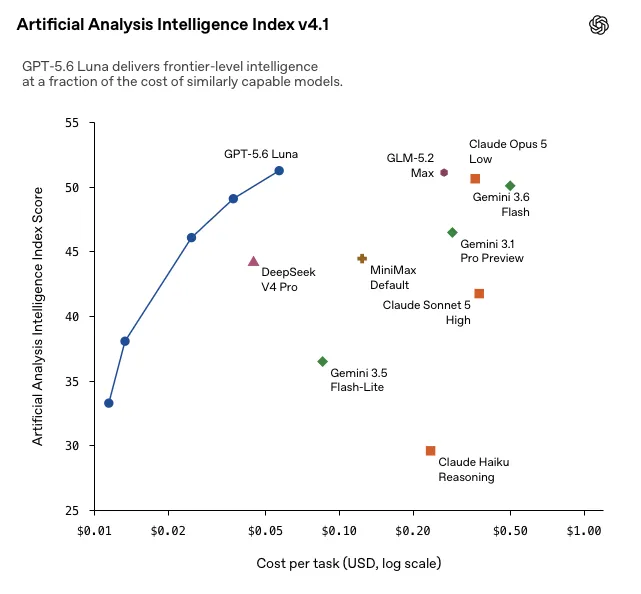
So right now Codex is actually the best bang-for-the-buck solution. It also offers an IDE extension for VS Code.
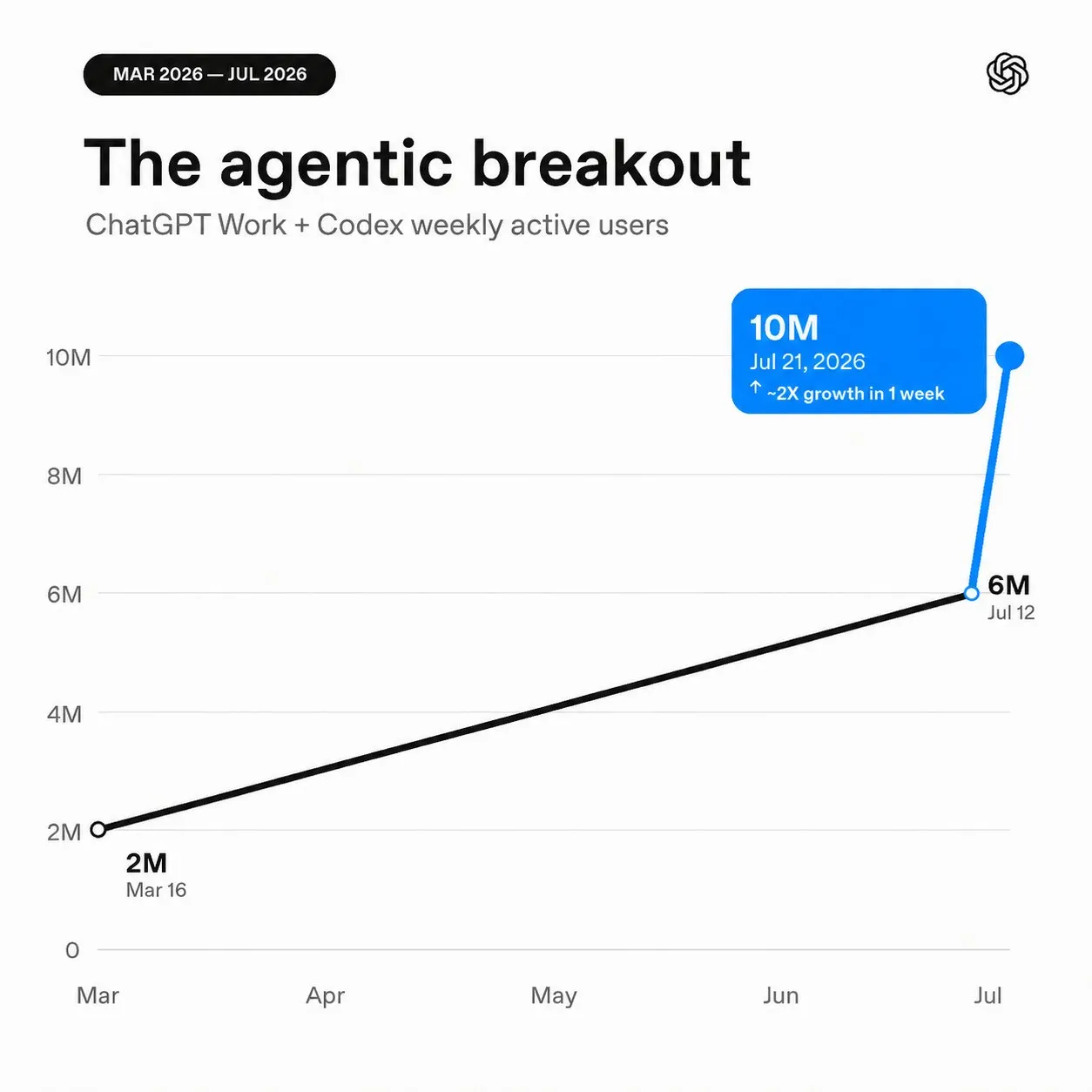
OpenAI’s Codex lead posted that Codex and ChatGPT Work together crossed 15 million weekly active users in August 2026, up from 10 million in late July. So they grew by 50% in about two weeks!
What do I actually use?
Right now I work in Obsidian and Claude Code. The cornerstone is Obsidian: it stores all information, all my work results, and the interchangeable part is the language model. I can basically switch to Codex tomorrow (and probably will, due to pricing), because anything I ever worked out with Claude or other AI agents is persisted in my Obsidian vault.